Showing posts with label file upload. Show all posts

Tuesday, May 26, 2015

How to submit form with file upload field to Spring MVC controller?

Here is a very simple example on how to submit form with file upload field to Spring mvc.


1. Make sure you have org.apache.commons.fileupload.FileItemFactory in your library.
I have two blogs on how to add this jar into jboss environment.
http://jijli.blogspot.com/2015/04/jboss-module-dependency-error-caused-by.html
http://jijli.blogspot.com/2015/05/how-to-add-jar-in-maven-project-in.html

2. Add the following in Spring servlet-context.xml.

 <!-- Enable this for eventual integration of file upload functionality-->  
 <bean class="org.springframework.web.multipart.commons.CommonsMultipartResolver" id="multipartResolver">  
  <!-- setting maximum upload size -->  
  <property name="maxUploadSize" value="20000000"/>   
 </bean>  

3. HTML form.

 <html>  
 <head>  
 <title>Upload File Request Page</title>  
 </head>  
 <body>  
      <form method="POST" action="uploadFile" enctype="multipart/form-data">  
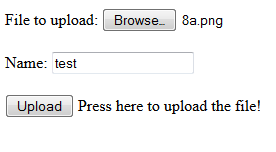
           File to upload: <input type="file" name="file"><br /> <br />  
           Name: <input type="text" name="name"><br /> <br />   
           <input type="submit" value="Upload"> Press here to upload the file!  
      </form>  
 </body>  
 </html>  


4. Spring MVC controller

 import java.io.BufferedOutputStream;  
 import java.io.File;  
 import java.io.FileOutputStream;  
 import org.slf4j.Logger;  
 import org.slf4j.LoggerFactory;  
 import org.springframework.stereotype.Controller;  
 import org.springframework.ui.ModelMap;  
 import org.springframework.web.bind.annotation.RequestMapping;  
 import org.springframework.web.bind.annotation.RequestMethod;  
 import org.springframework.web.bind.annotation.RequestParam;  
 import org.springframework.web.bind.annotation.ResponseBody;  
 import org.springframework.web.multipart.MultipartFile;  
 /**  
  * Handles requests for the application file upload requests  
  */  
 @Controller  
 public class FileUploadController {  
      private static final Logger logger = LoggerFactory  
                .getLogger(FileUploadController.class);  
      @RequestMapping(value = "/uploadFile", method = RequestMethod.GET )  
      public String uploadfile(ModelMap model)  
      {  
           return "upload";  
      }       
      /**  
       * Upload file using Spring Controller  
       */  
      @RequestMapping(value = "/uploadFile", method = RequestMethod.POST)  
      public @ResponseBody  
      String uploadFileHandler(@RequestParam("name") String name,  
                @RequestParam("file") MultipartFile file) {  
           if (!file.isEmpty()) {  
                try {  
                     byte[] bytes = file.getBytes();  
                     // Creating the directory to store file  
                     String rootPath = System.getProperty("catalina.home");  
                     File dir = new File(rootPath + File.separator + "tmpFiles");  
                     if (!dir.exists())  
                          dir.mkdirs();  
                     // Create the file on server  
                     File serverFile = new File(dir.getAbsolutePath()  
                               + File.separator + name);  
                     BufferedOutputStream stream = new BufferedOutputStream(  
                               new FileOutputStream(serverFile));  
                     stream.write(bytes);  
                     stream.close();  
                     logger.info("Server File Location="  
                               + serverFile.getAbsolutePath());  
                     return "You successfully uploaded file=" + name;  
                } catch (Exception e) {  
                     return "You failed to upload " + name + " => " + e.getMessage();  
                }  
           } else {  
                return "You failed to upload " + name  
                          + " because the file was empty.";  
           }  
      }  
 }  


Wednesday, May 6, 2015

How to make file upload style to look same in all browsers?

I have a file upload feature in my application. I found it looks different in all different browsers if I just use <input type='file'>.


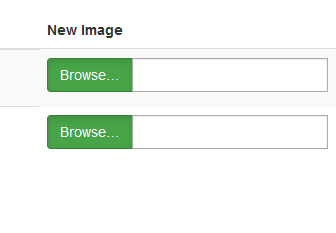
After some research, I found out a way to make it looks like a button with different styles by using Bootstrap.  It will display all the same in different browsers, and you can choose the right style that matches your design.


HTML code:

  <div class="input-group">                                                                                                           
            <span class="input-group-btn">                                                                                                       
                <span class="btn btn-success btn-file active">                                                                                             
                  Browse&hellip; <input type="file" id="uploadimage" name="uploadimage[]" class="form-control" multiple>                                                                 
                </span>                                                                                                                  
           </span>                                                                                                                   
   <input type="text" class="form-control" readonly>                                                                                              
 </div>                                                                                                                     

CSS:

 .btn-file {  
   position: relative;  
   overflow: hidden;  
 }  
 .btn-file input[type=file] {  
   position: absolute;  
   top: 0;  
   right: 0;  
   min-width: 100%;  
   min-height: 100%;  
   font-size: 100px;  
   text-align: right;  
   filter: alpha(opacity=0);  
   opacity: 0;  
   outline: none;  
   background: white;  
   cursor: inherit;  
   display: block;  
 }  
 input[readonly] {  
  background-color: white !important;  
  cursor: text !important;  
 }  


JS code:

 $(document).on('change', '.btn-file :file', function() {            
  var input = $(this),                             
    numFiles = input.get(0).files ? input.get(0).files.length : 1,      
    label = input.val().replace(/\\/g, '/').replace(/.*\//, '');       
  input.trigger('fileselect', [numFiles, label]);                
 });                                       
 $(document).ready( function() {                         
   $('.btn-file :file').on('fileselect', function(event, numFiles, label) {  
     var input = $(this).parents('.input-group').find(':text'),       
       log = numFiles > 1 ? numFiles + ' files selected' : label;     
     if( input.length ) {                          
       input.val(log);                           
     } else {                                
       if( log ) alert(log);                        
     }                                    
   });                                     
 });