I have two blogs on how to add this jar into jboss environment.
http://jijli.blogspot.com/2015/04/jboss-module-dependency-error-caused-by.html
http://jijli.blogspot.com/2015/05/how-to-add-jar-in-maven-project-in.html
2. Add the following in Spring servlet-context.xml.
 <!-- Enable this for eventual integration of file upload functionality-->
 <bean class="org.springframework.web.multipart.commons.CommonsMultipartResolver" id="multipartResolver">
  <!-- setting maximum upload size -->
  <property name="maxUploadSize" value="20000000"/>
 </bean>
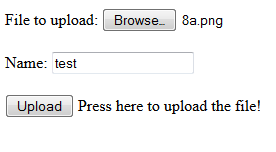
3. HTML form.
 <html>
 <head>
 <title>Upload File Request Page</title>
 </head>
 <body>
      <form method="POST" action="uploadFile" enctype="multipart/form-data">
           File to upload: <input type="file" name="file"><br /> <br />
           Name: <input type="text" name="name"><br /> <br />
           <input type="submit" value="Upload"> Press here to upload the file!
      </form>
 </body>
 </html>
4. Spring MVC controller
 import java.io.BufferedOutputStream;
 import java.io.File;
 import java.io.FileOutputStream;
 import org.slf4j.Logger;
 import org.slf4j.LoggerFactory;
 import org.springframework.stereotype.Controller;
 import org.springframework.ui.ModelMap;
 import org.springframework.web.bind.annotation.RequestMapping;
 import org.springframework.web.bind.annotation.RequestMethod;
 import org.springframework.web.bind.annotation.RequestParam;
 import org.springframework.web.bind.annotation.ResponseBody;
 import org.springframework.web.multipart.MultipartFile;
 /**
  * Handles requests for the application file upload requests
  */
 @Controller
 public class FileUploadController {
      private static final Logger logger = LoggerFactory
                .getLogger(FileUploadController.class);
      @RequestMapping(value = "/uploadFile", method = RequestMethod.GET )
      public String uploadfile(ModelMap model)
      {
           return "upload";
      }
      /**
       * Upload file using Spring Controller
       */
      @RequestMapping(value = "/uploadFile", method = RequestMethod.POST)
      public @ResponseBody
      String uploadFileHandler(@RequestParam("name") String name,
                @RequestParam("file") MultipartFile file) {
           if (!file.isEmpty()) {
                try {
                     byte[] bytes = file.getBytes();
                     // Creating the directory to store file
                     String rootPath = System.getProperty("catalina.home");
                     File dir = new File(rootPath + File.separator + "tmpFiles");
                     if (!dir.exists())
                          dir.mkdirs();
                     // Create the file on server
                     File serverFile = new File(dir.getAbsolutePath()
                               + File.separator + name);
                     BufferedOutputStream stream = new BufferedOutputStream(
                               new FileOutputStream(serverFile));
                     stream.write(bytes);
                     stream.close();
                     logger.info("Server File Location="
                               + serverFile.getAbsolutePath());
                     return "You successfully uploaded file=" + name;
                } catch (Exception e) {
                     return "You failed to upload " + name + " => " + e.getMessage();
                }
           } else {
                return "You failed to upload " + name
                          + " because the file was empty.";
           }
      }
 }