Tuesday, February 23, 2016

How to get response back immediately after WSO2 ESB Proxy Service get the message?

   
I send a message to ESB proxy service, and I would like to get response immediately after the service receive the content and put into the message queue. That means the proxy service will send back response message before it gets processed.

WSO2 ESB provides properties as a way to control different aspects of the messages flowing through the mediation engine. They will not change the content (payload) of the message but they will be used to change the behavior of the message flowing through the ESB.

FORCE_SC_ACCEPTED is the property we could use for this purpose.

FORCE_SC_ACCEPTED

When set to true, this property forces a 202 HTTP response to the client so that it stops waiting for a response.
( 202 HTTP is for the request has been accepted for processing, but the processing has not been completed. )

We can set this property as below.

<property name="FORCE_SC_ACCEPTED" scope="axis2" value="true"/>

This property can be used in scenarios where client send a message to the ESB and ESB will store the message in a persistent store like a message store. In this scenario, client will wait until the timeout if ESB do not send any response. In this kind of scenario, we can use this property and send a 202 Accepted response to the client. Here is an example configuration where ESB store a message in a message store.

  <inSequence>  
    <property name="FORCE_SC_ACCEPTED" scope="axis2" type="STRING" value="true"/>  
    <store messageStore="POInbound"/>  
   </inSequence>  


Monday, February 22, 2016

Use WSO2 ESB Developer Studio to Create my first project (2) - Deployment

1. Create Composite Application project
WSO2 DevStudio allows you to package your artifacts into a Composite Application aRchive (CAR) and deploy it to WSO2 servers.

1) Click on Composite Application Project in Developer Studio Dashboard.


 2) Enter composite project name.

 3) Click finish button.


2. Add WSO2 ESB server in Developer Studio

We've installed WSO2 ESB server in my machine. Here we would like to add ESB server to Developer Studio. For detail on how to install WSO2 ESB server, please see my previous blog.

Setup WSO2 ESB server and ActiveMQ server (Part 1) - Installation


Setup WSO2 ESB server and ActiveMQ server (Part 2)


Setup WSO2 ESB server and ActiveMQ server (Part 3) - WSO2 ESB and ActiveMQ connection


1) Click on Add Server - Server in Developer Studio Dashboard.

 
2)  Choose the server type.
3) Click Finish button.

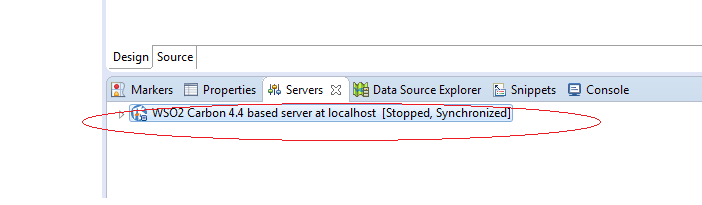
4) Now you can see the WSO2 ESB server showing under servers tab.
 

3. Run Composite application on ESB server.
1) Right click on the composite application name, and choose Export composite Application Project.

2) Enter export destination, then click next button.
 

3) Select artifact to include in the CAR file.
 

4Right click on the composite application, and choose Run As , then Run on Server.
 
5) Choose the server


6) Click on Finish button.

7) Server is running now. We may go to WSO2 ESB server to check if the services created in the developer studio have been deployed to the ESB server.


Thursday, February 18, 2016

Use WSO2 ESB Developer Studio to Create my first project (1) - Installation, Project Setup

1. Go to the following website to download the latest developer studio.
http://wso2.com/products/developer-studio/

2. Install developer studio in my local machine.

3. Click Eclipse I just installed and get into Eclipse.

4. Click on Developer Studio tab, then click Open Dashboard.


5. Click Maven Multi Module project

6. Enter group id and artifact id, then click on finish button.

7.Create ESB project. Click on ESB Config project.


8.  Choose new esb config project.
9. Enter ESB project name, click Finish.

10. Now I would like to create a new proxy service.

11.  Choose create a new proxy service, click on next.


12. Enter the service name, click finish.
13. Now the proxy service xml file is generated and opened in the IDE as below.
From here, we can drag Mediators or Endpoints from left side of palette to the design diagram.


Wednesday, February 17, 2016

How to send xml message through servlet http post?

I want to send an xml file to a service through servlet http post. After I did some research and I found a way to easily do this.

1. I chose to use Apache HttpComponents.

2. Download the latest HttpClient jars from https://hc.apache.org/downloads.cgi

3. In my servlet, I import the following classes.

 import org.apache.http.HttpResponse;  
 import org.apache.http.client.HttpClient;  
 import org.apache.http.client.methods.HttpPost;  
 import org.apache.http.entity.StringEntity;  
 import org.apache.http.impl.client.HttpClientBuilder;  
 import org.apache.http.util.EntityUtils;  

4. In the doPost method, I add the following code.

  // HTTP post xml document to outside service  
           HttpPost post = new HttpPost("https://testserviceurl");  
           post.setHeader("Content-Type", "application/xml");  
           post.setEntity(new StringEntity(xmlString));  
           HttpClient client = HttpClientBuilder.create().build();  
           HttpResponse resp = client.execute(post);  
           String result = EntityUtils.toString(resp.getEntity());  
           System.out.println("post result:" + result);  

HttpClient really provides a simply way to do the job.


Thursday, August 6, 2015

How to split big XML file into small files with certain number of items?

I have a huge xml file with over 2000 PO receipts. To make the data processing fast, I would like to split this big file into small xml files.

This is the structure of original xml file.


This is the split file I would like to have. This file is with same header information as the original one.


This is the code I wrote in Java.

 public class XmlSplit {  
   public static void main(String [] args) throws Exception {  
     File input = new File("input.xml");  
     DocumentBuilderFactory dbf = DocumentBuilderFactory.newInstance();  
     Document doc = dbf.newDocumentBuilder().parse(input);  
     XPath xpath = XPathFactory.newInstance().newXPath();  
     NodeList headernodes = (NodeList) xpath.evaluate("//PurchaseReceiptMessage/Header", doc, XPathConstants.NODESET);  
     NodeList nodes = (NodeList) xpath.evaluate("//PurchaseReceiptMessage/PurchaseReceipt", doc, XPathConstants.NODESET);  
     int itemsPerFile = 5;  
     int fileNumber = 0;  
     Document currentDoc = dbf.newDocumentBuilder().newDocument();  
     Node rootNode = currentDoc.createElement("PurchaseReceiptMessage");  
     for (int i=1; i <= headernodes.getLength(); i++) {  
     Node headerNode = currentDoc.importNode(headernodes.item(i-1), true);  
     rootNode.appendChild(headerNode);  
     }  
     File currentFile = new File(fileNumber+".xml");  
     for (int i=1; i <= nodes.getLength(); i++) {  
       Node imported = currentDoc.importNode(nodes.item(i-1), true);  
       rootNode.appendChild(imported);  
       if (i % itemsPerFile == 0) {  
         writeToFile(rootNode, currentFile);  
         rootNode = currentDoc.createElement("PurchaseReceiptMessage");  
         currentFile = new File((++fileNumber)+".xml");  
       }  
     }  
     writeToFile(rootNode, currentFile);  
   }  
   private static void writeToFile(Node node, File file) throws Exception {  
     Transformer transformer = TransformerFactory.newInstance().newTransformer();  
     transformer.transform(new DOMSource(node), new StreamResult(new FileWriter(file)));  
   }  
 }  


Monday, July 20, 2015

How to create a function in Jquery and added into an element? (jquery delegation)

I have a json data, and want to process it in Javascript and meanwhile generate a grid to append in  <form id="supplierFilter">.

The code is as following.

Javascript code:

 $(document).ready(function() {  
      var DTclass = ${class};  
      $.fn.classfunction = function() {  
            console.log("classes json:"+DTclass);  
          var columndiv;  
          var classes;  
          for (var i = 0; i < DTclass.length; i++) {  
               columndiv = $("<div class='col-sm-3'>");  
               classes = $("<div class='checkbox'>");  
               classes.append("<label> <input name='filter' value='"+DTclass[i].IMG_FILE_ID+"' type='checkbox'/>     <img src='${pageContext.request.contextPath}/download/"+DTclass[i].IMG_FILE_ID+"' alt='"+DTclass[i].DISPLAY_NAME+"' title='"+DTclass[i].DISPLAY_NAME+"'' /> "+DTclass[i].DISPLAY_NAME);  
               columndiv.append(classes);  
            $('#supplierFilter').append(columndiv);   
          }  
        };   
             $('#supplierFilter').classfunction();            
      )}    


HTML code:

 <form id="supplierFilter"></form>  


At beginning, I just use a regular javascript function, it did generate the html code, but when I clicked on the checkbox function, the function won't be triggered. This is caused by jquery delegation. There are more detail information from :
http://learn.jquery.com/events/event-delegation/

Wednesday, July 15, 2015

How to get last inserted id in DB2?

I have two tables in db2, one child, one parent. I would like to insert data into one table, and get the id (which auto generated in the db2,) then insert the id into another table as a foreign key by using ETL tool, Talend open studio.

After a long time research I found out a solution.
Within the same connection and same transaction use tDB2Input with this select:

 SELECT Identity_val_Local() as id FROM sysibm.sysdummy1  

The Talend job is like this: