Thursday, April 16, 2015

Setup WSO2 ESB server and ActiveMQ server (Part 1) - Installation

I have a new project which need to post an xml with a data range to a third party url, then get an xml response back, at last to process the response xml message and save it into database.
I've done this kind of job by using pure java code or Talend ETL open studio.

This time I am trying to using WSO2 ESB server and ActiveMQ server to finish the job.

1. Install ESB and ActiveMQ
 I need to install WSO2 ESB server and ActiveMQ server in my local machine,
These are the version I installed in my local.


2. ESB/ActiveMQ configuration


1) Copy relevant JMS client libraries to WSO2 ESB.
For Apache ActiveMQ, copy
[ActiveMQ_HOME]/lib/
activemq-broker-5.8.0
activemq-client-5.8.0,
geronimo-j2ee-management_1.1_spec-1.0.1.jar and
geronimo-jms_1.1_spec-1.1.1.jar
hawtbuf-1.9

to
[WSO2 ESB HOME]/repository/components/lib

2)  To enable JMS queues, define JNDI in [WSO2 ESB Home]\repository\conf\jndi.properties
connectionfactory.QueueConnectionFactory = amqp://admin:admin@clientID/test?brokerlist='tcp://localhost:61616'

3) Enable JMS Receiver
Edit  Axis2 configuration file ([ESB Home] \repository\conf\axis2\axis2.xml
Uncomment <transportReceiver> section under “<!--Uncomment this and configure as appropriate for JMS transport support, after setting up your JMS environment (e.g. ActiveMQ) -->”

4) Enable JMS Sender
  <!-- uncomment this and configure to use connection pools for sending messages> -->
  <transportSender name="jms" class="org.apache.axis2.transport.jms.JMSSender"/>


3. Start server to verify

Go to [wso2esbhome]\bin directory
run wso2server.bat

Go to [activemq home]\bin 
run activemq.bat

Then I can go to console to verify if the servers are on.

The WSO2 ESB server - Console URL is https://localhost:9443/carbon/admin/login.jsp
ActiveMQ server - Console URL is http://localhost:8161/admin/queues.jsp

The user name and password for both servers are admin/admin.

If everything is correct, we can land on the following web console page.


Wednesday, April 15, 2015

How to get element with its name attribute by using jQuery?

In jQuery, it use # to get id attribute  and . to get  class attribute.

For example, in the jQuery code like this,


 $("#classtable").on("click",".removebutton",function ()  

It will get the attribute from HTML below.

 <table id="classtable" class="table table-striped">  
 ...  
 <button type="button" class="removebutton" title="Remove this class">  
 .....  
 <input type="text" id="displayName" name="displayName" >  

But for the name attribute, we have to use this way:

$('[name="displayName"]').dosomthing();

Friday, April 3, 2015

How to read BLOB column in a database table and save it to a file by using Talend ?

In my development, I saved a file into BLOB column. I would like to check if the data in BLOB column is correct. I use Talend Open Studio  to create a simple job to read BLOB data out of database.

This is the simple job I created in Talend.


In this job, I used a custom component, tLOBDownload. You can download it by click on the name.
If you don't know how to install a custom component, you can reference document in Talend site.
How to install a custom component?


The detail for each component setup is as below.

This is the db2Input setup.

 This is tLOBDownload setup.  Please note the type of file is Object. (Circled in red).
The BLOB will be saved into a file.

Wednesday, April 1, 2015

JPA Relationship between Entities

I have a CompanyClass table and each class can only have one image saved in the filestore table in the database. And the image file saved in Filestore table only match one Companyclass. I would like to use JPA to do data retrieving, saving and removing.


This is a OneToOne mapping relationship in JPA. My entities are like this.

  @Entity   
  @Table(name="COMPANYCLASS", schema="xxx")   
  public class CompanyClass implements Serializable {   
    private static final long serialVersionUID = 1L;   
    @Id   
    @GeneratedValue(strategy=GenerationType.IDENTITY)   
    @Column(name="CLASS_ID",unique = true, nullable = false)   
    private Long classId;   
    @OneToOne (targetEntity=FileStore.class, cascade = CascadeType.ALL)   
    @JoinColumn(name="IMG_ID", referencedColumnName="FILE_ID")   
    private FileStore fileStore; 
    @Column(name="FILE_NAME")   
    private String fileName; 
   ....
    (get and set methods)   
   ....   


 @Entity  
 @Table(name="FILESTORE", schema="xxxx")  
 public class FileStore implements Serializable {  
      private static final long serialVersionUID = 1L;  
      @Id  
      @GeneratedValue(strategy=GenerationType.IDENTITY)  
      @Column(name="FILE_ID" ,unique = true, nullable = false)  
      private Long fileId;  
      @OneToOne(mappedBy="fileStore")  
      private CompanyClass companyClasses;  
 ....  
 (get and set method)       
 ....  

I specified my table primary key to self-incremented in the database side. So I use
 @GeneratedValue(strategy=GenerationType.IDENTITY) 

In this example, my CompanyClass is  the owner. So in the FileStore entity, it is mappedBy ="fileStore". This fileStore is the attribute in the CompanyClass.


  @JoinColumn
A Join Column in JPA is a column in the owner side entity that refers to a key (usually a primary key) in the non-owner or inverse entity.

In the CompanyClass entity, I have
 cascade = CascadeType.ALL
 This means the persistence will propagate (cascade) all EntityManager operations (PERSIST, REMOVE, REFRESH, MERGE, DETACH) to the relating entities.

For example, if I want to insert a new companyclass with an image into database, I can just write code like this.

  EntityManager emgr;  
  CompanyClass cclass = new CompanyClass();  
            FileStore fileStore= new FileStore();  
            fileStore.setFileName = "Image.png";  
            cclass.setFileStore(fileStore);       
  emgr.persist(cclass);  
  emgr.close();  


Wednesday, March 25, 2015

Solved: JPA persist cannot save anything to database and no exception

I am using Spring JPA to insert data into database. In the persistence.xml, I use JTA transaction type, instead of RESOURCE_LOCAL. This means we use JTA and container managed transactions. 

 <persistence-unit name="name-unit" transaction-type="JTA">  

During the development time, I had some difficulties to use persist to save data into database. Here are a few things I would like to share to  pay attention when we work on this.

1. Setup persistence.xml. The following is what I used. The highlighted ones were new added when the code didn't work.

 <?xml version="1.0" encoding="UTF-8" standalone="no"?>  
 <persistence xmlns="http://java.sun.com/xml/ns/persistence"  
      xmlns:xsi="http://www.w3.org/2001/XMLSchema-instance" version="2.0"  
      xsi:schemaLocation="http://java.sun.com/xml/ns/persistence http://java.sun.com/xml/ns/persistence/persistence_2_0.xsd">  
      <persistence-unit name="name-unit"           transaction-type="JTA">  
           <provider>org.hibernate.ejb.HibernatePersistence</provider>  
           <jta-data-source>java:/xxx/datasources/dsname</jta-data-source>  
           <class>xxx.model.Class</class>  
                 <exclude-unlisted-classes>false</exclude-unlisted-classes>  
           <properties>  
                <property name="connection.driver_class" value="com.ibm.db2.jcc.DB2Driver" />  
                <property name="hibernate.dialect" value="org.hibernate.dialect.DB2Dialect" />  
                <property name="hibernate.show_sql" value="true" />  
                <property name="hibernate.format_sql" value="true" />  
                <property name="hibernate.ejb.naming_strategy" value="org.hibernate.cfg.ImprovedNamingStrategy" />  
                <property name="hibernate.connection.charSet" value="UTF-8" />  
                <property name="hibernate.max_fetch_depth" value="5" />  
                <property name="hibernate.connection.clientProgramName" value="supsearch" />  
                <property name="hibernate.cache.use_second_level_cache" value="false" />  
                <property name="hibernate.cache.use_query_cache" value="false" />  
                <property name="hibernate.hbm2ddl.import_files_sql_extractor" value="org.hibernate.tool.hbm2ddl.MultipleLinesSqlCommandExtractor" />  
                <property name="hibernate.validator.apply_to_ddl" value="false" />  
                <property name="hibernate.validator.autoregister_listeners" value="false" />                      
                <property name="jboss.entity.manager.factory.jndi.name" value="java:/name-emf" />  
                <property name="hibernate.transaction.jta.platform" value="org.hibernate.service.jta.platform.internal.JBossAppServerJtaPlatform" />  
                <property name="hibernate.generate_statistics" value="true" />  
       </properties>  
      </persistence-unit>  
 </persistence>  


2. Setup Spring JTA Transaction Manager and other JTA information
Spring will automatically discover the underlying JTA implementation.
We need to add JTA Transaction Manager into applicationContext.xml, in my case it is called web-persistence.xml.


 <?xml version="1.0" encoding="UTF-8" standalone="no"?>  
 <beans xmlns="http://www.springframework.org/schema/beans"   
      xmlns:context="http://www.springframework.org/schema/context"   
      xmlns:jee="http://www.springframework.org/schema/jee"   
      xmlns:tx="http://www.springframework.org/schema/tx"  
      xmlns:xsi="http://www.w3.org/2001/XMLSchema-instance"  
      xsi:schemaLocation="http://www.springframework.org/schema/beans   
           http://www.springframework.org/schema/beans/spring-beans.xsd       
           http://www.springframework.org/schema/context   
           http://www.springframework.org/schema/context/spring-context.xsd       
           http://www.springframework.org/schema/jee   
           http://www.springframework.org/schema/jee/spring-jee.xsd       
           http://www.springframework.org/schema/tx   
           http://www.springframework.org/schema/tx/spring-tx.xsd">  
      <!-- Note: imported by SecurityConfig.java -->  
  <context:mbean-export/>  
      <jee:jndi-lookup id="entityManagerFactory" jndi-name="persistence/name-unit" expected-type="javax.persistence.EntityManagerFactory" />  
      <bean class="org.springframework.orm.jpa.support.PersistenceAnnotationBeanPostProcessor">  
           <property name="persistenceUnits">  
                <map>          
                     <entry key="name-unit" value="persistence/name-unit" />  
                </map>  
           </property>  
           <property name="persistenceContexts">  
                <map>  
                     <entry key="name-unit" value="persistence/name-context"/>  
                </map>  
           </property>  
      </bean>  
      <bean class="org.springframework.orm.jpa.JpaTransactionManager" id="transactionManager">  
           <property name="entityManagerFactory" ref="entityManagerFactory" />  
      </bean>  
      <tx:annotation-driven/>       
      <tx:jta-transaction-manager/>  
 </beans>  

3. Injection via @PersistenceContext

The EntityManager itself is created by the container using the information in the persistence.xml, so to use it at runtime, we simply need to request it be injected into one of our components. We do this via @PersistenceContext.

@PersistenceContext should put into DAO impl. In my case it is called repository impl.

 @Repository  
 public class XxxxClassRepositoryImpl implements  
           XxxxClassRepository, Serializable {  
      private static final long serialVersionUID = 1L;  
      @PersistenceContext   
      private EntityManager emgr;  


4. Add @Transactional Annotation 

In the DAO impl layer and service impl layer (if you have), we need to add @Transcational annotation in. This annotation can be added in the class level and method level.

  @Repository   
  @Transactional  
  public class XxxxClassRepositoryImpl implements   
       XxxxClassRepository, Serializable {   
    private static final long serialVersionUID = 1L;   
    @PersistenceContext    
    private EntityManager emgr;   


If you want to learn how Spring transactional really work, I found this blog is very helpful.
http://blog.jhades.org/how-does-spring-transactional-really-work/


Thursday, March 19, 2015

How to generate JPA entity from table by using Eclipse?

We've created tables in our database. We are going to use Eclipse to generate JPA entities from those existing tables.

1. Create or convert to a JPA project.
In Eclipse, if this is a new project, make it as a JPA project. If a project has been created and it is not a JPA project, we need to convert it into a JPA project.
To convert a current project to JPA project, you can just right click the project name, and choose Configure, then choose Convert to JPA Project.


Then click finish button.

2. Create a database connection under Data Source Explorer 

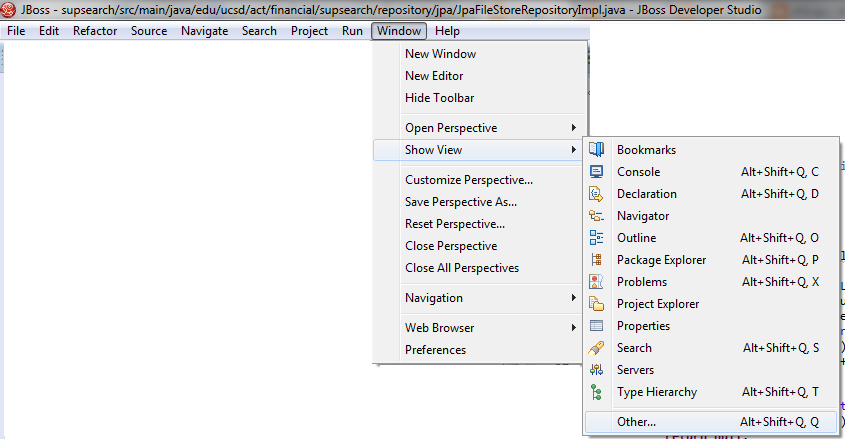
First click on the Window menu on top. Choose Show View, then click other.


Choose Data Source Explorer. Then click OK.


Now Data Source Explorer will show on the lower tab. Choose it, and right click on the Database Connections, you can create a new db connection here.


After a new connection is created, when we click on the name, the database will be connected. We can see tables here.

3. Generate JPA entities.

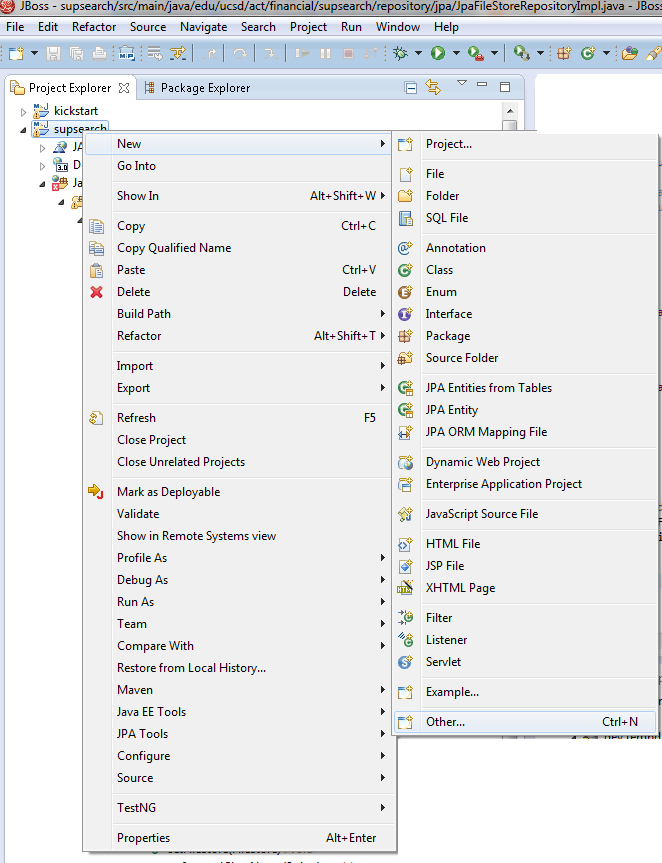
Right click on the project name, choose new, then Other, if JPA Entities from Tables not show.


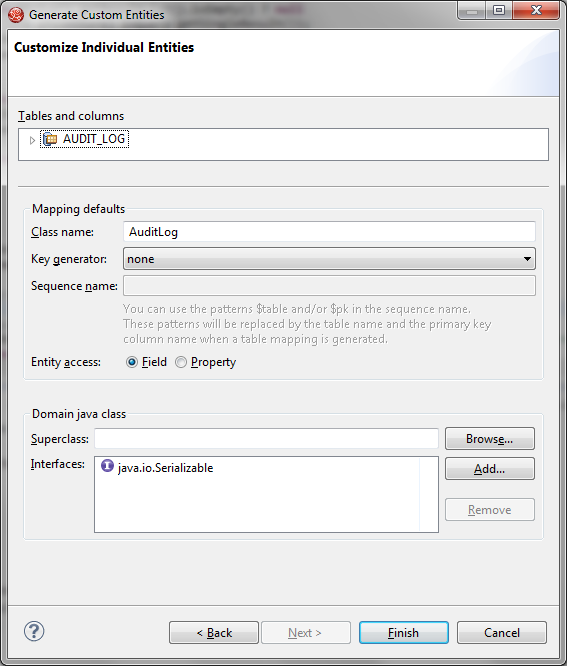
Choose a connection and table names you would like to generate JPA entities.


Write down your package name.


Write down your class name.Then Finish.


4. Check your generated entity code to make sure if you need to modify anything.


How to read image from BLOB column by using JPA and Spring MVC?

I need to read image from blob column and put it into a JSP to display in a web page.
I am using JPA and Spring MVC.
This is my sample FILESTORE table. The data type for column FILE_OBJ_L  is BLOB.


1. The JPA Entity is as below.

 @Entity  
 @Table(name="FILE_STORE")  
 @NamedQuery(name="FileStore.findAll", query="SELECT f FROM FileStore f")  
 public class FileStore implements Serializable {  
      private static final long serialVersionUID = 1L;  
      @Id  
      @Column(name="FILE_ID")  
      private Long fileId;  
      @Column(name="FILE_NAME")  
      private String fileName;  
      @Lob  
      @Column(name="FILE_OBJ_L",length = 31457280)  
   @Basic(fetch = FetchType.LAZY)  
      private byte[] fileObjL;  
      private String mimetype;  
      public FileStore() {  
      }  
      public Long getFileId() {  
           return this.fileId;  
      }  
      public void setFileId(Long fileId) {  
           this.fileId = fileId;  
      }  
      public String getFileName() {  
           return this.fileName;  
      }  
      public void setFileName(String fileName) {  
           this.fileName = fileName;  
      }  
      public byte[] getFileObjL() {  
           return this.fileObjL;  
      }  
      public void setFileObjL( byte[] fileObjL) {  
           this.fileObjL = fileObjL;  
      }  
 :  
 :  

2. DAO access layer (repository).

 @Override  
      public FileStore findByFileId(Long fileId) {  
           EntityManager emgr = emf.createEntityManager();  
           try {  
                Query query = emgr  
                          .createQuery("SELECT f FROM FileStore f WHERE f.fileId =:fileId");  
                query.setParameter("fileId", fileId);  
                FileStore filestore = (FileStore) query.getSingleResult();               // test and return  
                return filestore;  
           } catch (Exception ex) {  
                log.warn(  
                          "Error during jpa query for filestore by file id: {} {}",  
                          fileId, ex.getMessage() + " | " + ex.getCause());  
           } finally {  
                if (emgr != null) {  
                     emgr.close();  
                }  
           }  
           return null;  
      }  

3. I also have a service layer to call dao (repository).

 import org.springframework.beans.factory.annotation.Autowired;  
 import org.springframework.dao.DataAccessException;  
 import model.FileStore;  
 import repository.FileStoreRepository;  
 import org.springframework.stereotype.Service;  
 import org.springframework.transaction.annotation.Transactional;  
 @Service  
 public class FileStoreServiceImpl implements FileStoreService {  
   @Autowired  
      private FileStoreRepository filestoreRepository;  
   @Autowired  
   public FileStoreServiceImpl(FileStoreRepository filestoreRepository) {  
     this.filestoreRepository = filestoreRepository;  
   }    
   // FileStore requests by fileid  
      @Override  
      @Transactional(readOnly = true)  
      public FileStore findByFileId(Long fileid) throws DataAccessException {  
           return filestoreRepository.findByFileId(fileid);  
      }  
 }  

4. Spring MVC controller class.

 import javax.servlet.http.HttpServletResponse;  
 import org.springframework.beans.factory.annotation.Autowired;  
 import org.springframework.stereotype.Controller;  
 import org.springframework.web.bind.annotation.PathVariable;  
 import org.springframework.web.bind.annotation.RequestMapping;  
 import model.FileStore;  
 import service.FileStoreService;  
 @Controller  
 public class FileController {  
      @Autowired  
      private FileStoreService fileStoreService;  
      @RequestMapping("/download/{fileId}")  
      public String download(@PathVariable("fileId") Long fileId,  
                HttpServletResponse response) {  
           try {  
                if (fileId == null) {  
                     response.sendError(HttpServletResponse.SC_NOT_FOUND); // 404.  
                } else {  
                     // Lookup file by fileId in database.  
                     FileStore file = fileStoreService.findByFileId(fileId);  
                     // Check if file is actually retrieved from database.  
                     if (file != null) {  
                          if (file.getFileObjL() != null) {  
                               response.setContentType(file.getMimetype());  
                               response.setHeader("Content-Length",  
                                         String.valueOf(file.getFileObjL().length));  
                               // Write file content to response.  
                               response.getOutputStream().write(file.getFileObjL());  
                          }  
                     }  
                }  
           } catch (IOException e) {  
                e.printStackTrace();  
           }  
           return null;  
      }  
 }  

5. JSP page.

 <img src="${pageContext.request.contextPath}/download/7">  

Here, fieId=7

Or just simply test it through URL:http: //localhost:8080/supsearch/download/7

6. Note:

- Remember, HTTP does not allow to get image blob directly from the object. Each image needs to be a separate request to a separate URL. So you will need a controller to write the blob to the response stream.


- When I worked on this, I also got an error when it called the JPA DAO. The error is
SQL Error: -134, SQLState: 42907 on blob column.
This means the string is too long.
At that time I used the query as below.


 Query query = emgr.createQuery("SELECT distinct f FROM FileStore f WHERE f.fileId =:fileId");  

Then I changed the query, and removed "distinct" since the fileId is unique one. Then everything works fine.

 Query query = emgr.createQuery("SELECT f FROM FileStore f WHERE f.fileId =:fileId");  

 IBM wrote:  
 SQL0134N Improper use of a string column, host variable, constant, or function name.  
 Explanation: The use of the string name is not permitted.  
 An expression resulting in a string data type with a maximum length greater than 255 bytes is not permitted in:  
 * A SELECT DISTINCT statement  
 * A GROUP BY clause  
 * An ORDER BY clause  
 * A column function with DISTINCT  
 * A SELECT or VALUES statement of a set operator other than UNION ALL.  
 An expression resulting in a LONG VARCHAR or LONG VARGRAPHIC data type is not permitted in:  
 * A predicate other than EXISTS or NULL  
 * A column function  
 * The SELECT clause of a subquery of a predicate other than EXISTS or NULL  
 * The SELECT clause of a subselect in an INSERT statement  
 * The value expression of a SET clause in an UPDATE statement unless the expression is a LONG VARCHAR or LONG VARGRAPHIC host variable  
 * A SELECT statement of a set operator (except UNION ALL)  
 * VARGRAPHIC scalar function.  
 Federated system users: in a pass-through session, a data source-specific restriction can cause this error. See the SQL Reference documentation for the failing data sources.  
 The statement cannot be processed.  
 User Response: The requested operation on the string is not supported.  
 Note:  
 If it is unclear as to how the 255 byte limit is being exceeded, consider that codepage conversion operations may be required to evaluate the string expression. Depending on the source and target codepages, the target may have a greater length attribute than the source. For more information, refer to the SQL Reference for discussions on string restrictions and string conversions.  
 sqlcode:-134  
 sqlstate: 42907